> ## Documentation Index
> Fetch the complete documentation index at: https://docs.reown.com/llms.txt
> Use this file to discover all available pages before exploring further.
# Domain Verification
> How Reown's Verify API confirms an app's domain to wallets and end users, and how to get a domain verified.
Reown's domain verification feature is powered by the Verify API. It helps apps avoid impersonation, gives wallets a way to show verification status to end users, and lets end users confirm they're connecting to the intended website rather than a malicious one.
For the Verify API to work correctly, the app must use one of Reown's SDKs for apps (Reown AppKit or AppKit Core), and the wallet the user connects with must use Reown's SDK for wallets (WalletKit).
## How domain verification works
If the domain an end user connects to matches the one verified in the Reown dashboard, the user proceeds with confidence. If the domain doesn't match, the user is notified.
When a user initiates a connection with an application, the Verify API gives wallets four states to help determine whether the domain might be malicious. The API categorizes session proposals and session requests with a validation of `VALID`, `INVALID`, `UNKNOWN`, or `isScam`, which map to the four states below.
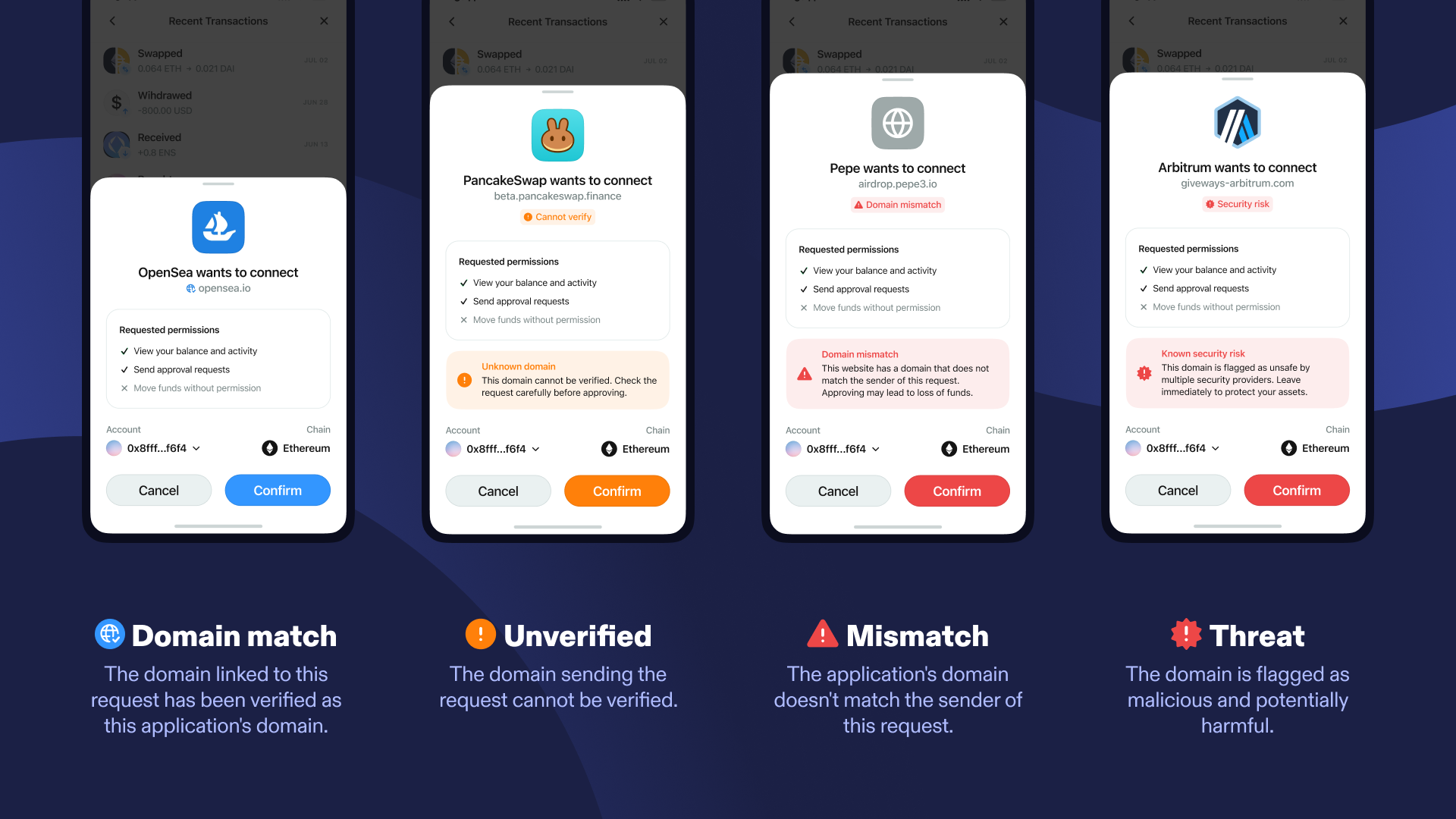 ### 1. Domain Match
> The domain linked to this request has been verified as this application's domain.
Shown when the domain a user is connecting to matches the application's verified domain in the registry, and the domain isn't flagged by any of the security tools Reown works with (Hexagate, ChainPatrol, Hypernative). The `verifyContext` on the request has a validation of `VALID`.
### 2. Cannot Verify
> The domain sending the request cannot be verified.
Shown when the domain isn't in the registry but also isn't flagged as suspicious. The `verifyContext` has a validation of `UNKNOWN`.
The Verify API can only verify domains in web apps. Apps built with React Native or Swift will always show "Cannot Verify" to end users.
### 3. Domain Mismatch
> The application's domain doesn't match the sender of this request.
Shown when the domain a user is connecting to differs from the domain the application verified in the registry, and the domain isn't flagged as suspicious. The `verifyContext` has a validation of `INVALID`.
### 4. Security Risk
> This domain is flagged as malicious and potentially harmful.
Shown when the domain has been flagged as malicious by one or more of the security tools Reown works with. The `verifyContext` on the request contains `isScam: true`.
The Verify API isn't designed to be bulletproof. It's designed to make the transaction process safer and more understandable for the end user.
## Get a domain verified
Two steps get an app to a domain match:
1. Open the project in the Reown dashboard.
2. Select the "Configuration" tab.
3. Scroll to the "Domain" section and click "+ Domain".
4. Enter the domain name.
5. Click "Allowlist" to submit.
Configure the same domain in the metadata passed when initializing the Reown AppKit instance.
```js metadata.js theme={null}
const metadata = {
name: "My Website",
description: "My Website description",
url: "https://mywebsite.com",
icons: ["https://avatars.mywebsite.com/"],
};
```
```js createAppKit.js theme={null}
createAppKit({
metadata: metadata,
projectId,
adapters: [...],
networks: [...],
});
```
Wallets use this metadata to check the app's verification status via the Verify API. An incorrect or missing domain in the metadata means `verifyContext` won't return `VALID`, and the app may be flagged "Cannot verify" or "Domain mismatch".
Propagation can take up to 5 minutes after both steps are complete.
## Troubleshooting
The domain in the AppKit metadata may not match the domain users are connecting to, or the wrong domain may have been added to the Reown dashboard.
The app has been flagged as malicious by one of the security tools Reown works with. Contact the customer service team if this looks like a mistake.
Some wallets in the WalletConnect ecosystem use their own domain verification methods instead of the Verify API. This can show labels such as "External App" or return unexpected details. As of August 2026, MetaMask's mobile wallet UI update introduced a known issue preventing validation of valid apps; Reown is working with MetaMask to resolve it.
The Verify API only considers the domain listed in the app's metadata as the true domain. Additional domains added for affiliates or other purposes show as unverified — this protects end users from scams. There's currently no way to verify multiple domains for this use case.
The Verify API isn't recommended for non-browser setups — it relies on a browser context to validate the origin. Server-side Node.js SignClient connections always show an "unverified" warning because the attestation signals aren't available outside a browser environment.
### 1. Domain Match
> The domain linked to this request has been verified as this application's domain.
Shown when the domain a user is connecting to matches the application's verified domain in the registry, and the domain isn't flagged by any of the security tools Reown works with (Hexagate, ChainPatrol, Hypernative). The `verifyContext` on the request has a validation of `VALID`.
### 2. Cannot Verify
> The domain sending the request cannot be verified.
Shown when the domain isn't in the registry but also isn't flagged as suspicious. The `verifyContext` has a validation of `UNKNOWN`.
The Verify API can only verify domains in web apps. Apps built with React Native or Swift will always show "Cannot Verify" to end users.
### 3. Domain Mismatch
> The application's domain doesn't match the sender of this request.
Shown when the domain a user is connecting to differs from the domain the application verified in the registry, and the domain isn't flagged as suspicious. The `verifyContext` has a validation of `INVALID`.
### 4. Security Risk
> This domain is flagged as malicious and potentially harmful.
Shown when the domain has been flagged as malicious by one or more of the security tools Reown works with. The `verifyContext` on the request contains `isScam: true`.
The Verify API isn't designed to be bulletproof. It's designed to make the transaction process safer and more understandable for the end user.
## Get a domain verified
Two steps get an app to a domain match:
1. Open the project in the Reown dashboard.
2. Select the "Configuration" tab.
3. Scroll to the "Domain" section and click "+ Domain".
4. Enter the domain name.
5. Click "Allowlist" to submit.
Configure the same domain in the metadata passed when initializing the Reown AppKit instance.
```js metadata.js theme={null}
const metadata = {
name: "My Website",
description: "My Website description",
url: "https://mywebsite.com",
icons: ["https://avatars.mywebsite.com/"],
};
```
```js createAppKit.js theme={null}
createAppKit({
metadata: metadata,
projectId,
adapters: [...],
networks: [...],
});
```
Wallets use this metadata to check the app's verification status via the Verify API. An incorrect or missing domain in the metadata means `verifyContext` won't return `VALID`, and the app may be flagged "Cannot verify" or "Domain mismatch".
Propagation can take up to 5 minutes after both steps are complete.
## Troubleshooting
The domain in the AppKit metadata may not match the domain users are connecting to, or the wrong domain may have been added to the Reown dashboard.
The app has been flagged as malicious by one of the security tools Reown works with. Contact the customer service team if this looks like a mistake.
Some wallets in the WalletConnect ecosystem use their own domain verification methods instead of the Verify API. This can show labels such as "External App" or return unexpected details. As of August 2026, MetaMask's mobile wallet UI update introduced a known issue preventing validation of valid apps; Reown is working with MetaMask to resolve it.
The Verify API only considers the domain listed in the app's metadata as the true domain. Additional domains added for affiliates or other purposes show as unverified — this protects end users from scams. There's currently no way to verify multiple domains for this use case.
The Verify API isn't recommended for non-browser setups — it relies on a browser context to validate the origin. Server-side Node.js SignClient connections always show an "unverified" warning because the attestation signals aren't available outside a browser environment.