> ## Documentation Index
> Fetch the complete documentation index at: https://docs.reown.com/llms.txt
> Use this file to discover all available pages before exploring further.
# Deposit with Exchange - JavaScript
If you're looking to enable crypto payments in your online or in-person business, check out WalletConnect Pay, our all-in-one payments solution. [Learn more in the WalletConnect Pay docs →](https://docs.walletconnect.com/payments/overview)
**Deposit with Exchange** gives your users a seamless way to fund their connected wallets directly from centralized exchange accounts like Binance. Instead of forcing users to leave your app, log into their exchange, and manually handle withdrawals, you can offer a guided in-app flow that keeps them engaged and ready to transact.
## Quickstart
This feature will start working as soon as your team is on the allowed-list. Contact us [via our form here](https://share.hsforms.com/1_oWa8QkwRXi6oR0nZ_SIxQnxw6s) to get started.
Projects first need to install and set up Reown AppKit before integrating AppKit Pay. If you haven't done so, please refer to the [Reown AppKit docs](/appkit/overview#quickstart).
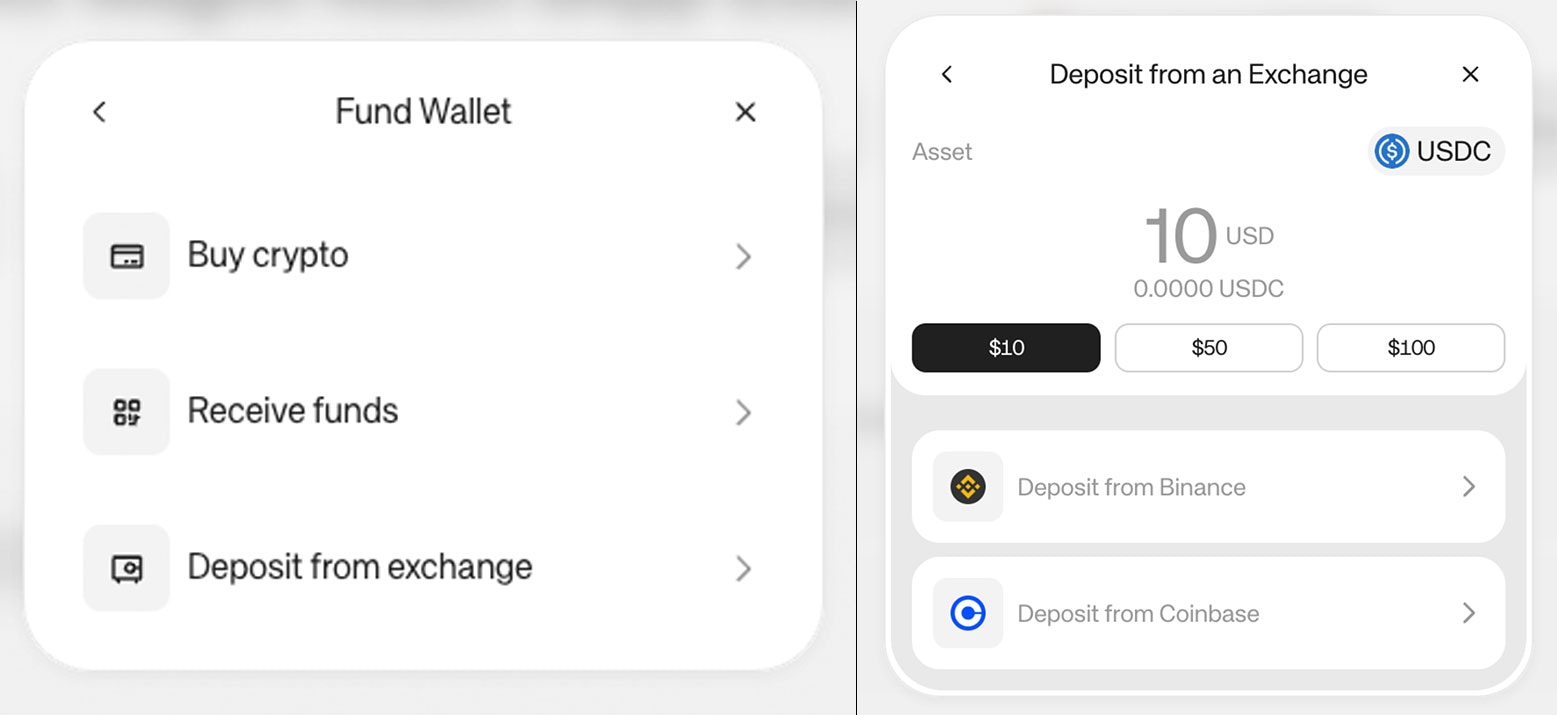
Clicking on Fund your wallet will show the modal below:
 ## Start Deposit with Exchange from a button
### Install the library
```bash npm theme={null}
npm install @reown/appkit-pay
```
```bash Yarn theme={null}
yarn add @reown/appkit-pay
```
```bash Bun theme={null}
bun a @reown/appkit-pay
```
```bash pnpm theme={null}
pnpm add @reown/appkit-pay
```
### Usage
Import the `baseUSDC` asset, the `pay` function and the `useAppKitAccount` hook to get the address of the connected wallet.
```ts theme={null}
import { baseUSDC, pay } from '@reown/appkit-pay';
```
Get the address of the connected wallet using the `subscribeAccount` function.
```ts theme={null}
let address = null;
const appKit = createAppKit({...}); // please check our docs or examples to understand how to create the AppKit instance
appKit.subscribeAccount(state => {
address = state['accountState']?.address;
})
```
In order to run the deposit, use the function `pay`. This function receives three parameters.
```ts theme={null}
// pay function returns a PaymentResult object
const result = await pay({
recipient: address,
amount: 0.0001,
paymentAsset: baseUSDC
});
if (result.success) {
console.log("Payment successful: "+ result.result);
} else {
console.error("Payment error: "+ result.error);
}
```
## Supported Networks and Assets
Currently, Deposit with Exchange supports the following assets on the following networks:
**Asset -> Network**
**Binance**
* USDC -> Ethereum, Optimism, Arbitrum, Base, Polygon, Solana
* USDT -> Ethereum, Optimism, Arbitrum, Polygon, Solana
* Native Solana
For access to additional networks or assets, contact us [via our form here](https://share.hsforms.com/1_oWa8QkwRXi6oR0nZ_SIxQnxw6s).
## Assets Configuration
For the moment, AppKit Pay has pre-configured these assets:
* baseETH, baseSepoliaETH, and baseUSDC
* ethereumUSDC, optimismUSDC, arbitrumUSDC, polygonUSDC and solanaUSDC
* ethereumUSDT, optimismUSDT, arbitrumUSDT, polygonUSDT and solanaUSDT
```ts theme={null}
import { baseETH } from '@reown/appkit-pay'
```
For custom assets, you can create a paymentAsset object with all the information:
```ts theme={null}
// Configure the paymentAsset
const paymentAssetDetails = {
network: 'eip155:8453', // Base Mainnet
asset: 'native', // Or USDC in Base: '0x833589fcd6edb6e08f4c7c32d4f71b54bda02913'
metadata: {
name: 'Ethereum', // Or 'USD Coin'
symbol: 'ETH', // Or 'USDC'
decimals: 18 // Or 6 for USDC
}
};
```
## Start Deposit with Exchange from a button
### Install the library
```bash npm theme={null}
npm install @reown/appkit-pay
```
```bash Yarn theme={null}
yarn add @reown/appkit-pay
```
```bash Bun theme={null}
bun a @reown/appkit-pay
```
```bash pnpm theme={null}
pnpm add @reown/appkit-pay
```
### Usage
Import the `baseUSDC` asset, the `pay` function and the `useAppKitAccount` hook to get the address of the connected wallet.
```ts theme={null}
import { baseUSDC, pay } from '@reown/appkit-pay';
```
Get the address of the connected wallet using the `subscribeAccount` function.
```ts theme={null}
let address = null;
const appKit = createAppKit({...}); // please check our docs or examples to understand how to create the AppKit instance
appKit.subscribeAccount(state => {
address = state['accountState']?.address;
})
```
In order to run the deposit, use the function `pay`. This function receives three parameters.
```ts theme={null}
// pay function returns a PaymentResult object
const result = await pay({
recipient: address,
amount: 0.0001,
paymentAsset: baseUSDC
});
if (result.success) {
console.log("Payment successful: "+ result.result);
} else {
console.error("Payment error: "+ result.error);
}
```
## Supported Networks and Assets
Currently, Deposit with Exchange supports the following assets on the following networks:
**Asset -> Network**
**Binance**
* USDC -> Ethereum, Optimism, Arbitrum, Base, Polygon, Solana
* USDT -> Ethereum, Optimism, Arbitrum, Polygon, Solana
* Native Solana
For access to additional networks or assets, contact us [via our form here](https://share.hsforms.com/1_oWa8QkwRXi6oR0nZ_SIxQnxw6s).
## Assets Configuration
For the moment, AppKit Pay has pre-configured these assets:
* baseETH, baseSepoliaETH, and baseUSDC
* ethereumUSDC, optimismUSDC, arbitrumUSDC, polygonUSDC and solanaUSDC
* ethereumUSDT, optimismUSDT, arbitrumUSDT, polygonUSDT and solanaUSDT
```ts theme={null}
import { baseETH } from '@reown/appkit-pay'
```
For custom assets, you can create a paymentAsset object with all the information:
```ts theme={null}
// Configure the paymentAsset
const paymentAssetDetails = {
network: 'eip155:8453', // Base Mainnet
asset: 'native', // Or USDC in Base: '0x833589fcd6edb6e08f4c7c32d4f71b54bda02913'
metadata: {
name: 'Ethereum', // Or 'USD Coin'
symbol: 'ETH', // Or 'USDC'
decimals: 18 // Or 6 for USDC
}
};
```