> ## Documentation Index
> Fetch the complete documentation index at: https://docs.reown.com/llms.txt
> Use this file to discover all available pages before exploring further.
# Options
The following options can be passed to the `createAppKit` function:
```ts theme={null}
createAppKit({ adapters, projectId, networks, ...options });
```
## networks
Array of networks that can be chosen from the `@reown/appkit/networks` library. This library retrieves the list of EVM networks from Viem and also includes the Solana networks.
```ts theme={null}
import { mainnet, solana } from "@reown/appkit/networks";
createAppKit({
// ...
networks: [mainnet, solana],
});
```
For custom networks, refer to this [doc page](/appkit/react/core/custom-networks).
## metadata
Metadata for your AppKit. The `name`, `description`, `icons`, and `url` are used at certain places like the wallet connection, sign message, etc screens. If not provided, they will be fetched from the metadata of your website's document object.
```ts theme={null}
createAppKit({
// ...
metadata: {
name: "My App",
description: "My App Description",
icons: ["https://myapp.com/icon.png"],
url: "https://myapp.com",
},
});
```
This information will primarily be used in modals when signing a transaction or message using [Embedded wallets (Smart Accounts)](/appkit/features/smart-accounts), or when verifying ownership with [SIWE/SIWX](/appkit/authentication/siwx/default) using any wallet.
For custom networks, refer to this [doc page](/appkit/react/core/custom-networks).
```typescript theme={null}
const icon = "data:image/png;base64,iVBORw0KGgoAAAANSUhEUgAAAAUAAAAFCAYAAACNbyblAAAAHElEQVQI12P4//8/w38GIAXDIBKE0DHxgljNBAAO9TXL0Y4OHwAAAABJRU5ErkJggg==";
createAppKit({
// ...
metadata: {
// ...
icons: [icon]
}
})
```
## defaultNetwork
Desired network for the initial connection as default:
```ts theme={null}
import { mainnet } from "@reown/appkit/networks";
createAppKit({
//...
defaultNetwork: mainnet,
});
```
```ts theme={null}
const mainnet = {
chainId: 1,
name: "Ethereum",
currency: "ETH",
explorerUrl: "https://etherscan.io",
rpcUrl: "https://cloudflare-eth.com",
};
createAppKit({
//...
defaultNetwork: mainnet,
});
```
```ts theme={null}
import { solana } from "@reown/appkit/networks";
createAppKit({
//...
defaultNetwork: solana,
});
```
## defaultAccountTypes
It allows you to configure the default account selected for the specified networks in AppKit. For example, if you want your EVM networks to use an EOA account by default, you can configure it as shown in the code below.
```ts theme={null}
createAppKit({
//...
defaultAccountTypes: { eip155: "eoa" },
});
```
Here are all the options you have for each network identifier or networks. Network identifier or networks available are `eip155` for EVM chains, `solana` for Solana, `bip122` for Bitcoin, and `polkadot` for Polkadot.
```ts theme={null}
type DefaultAccountTypes = {
eip155: "eoa" | "smartAccount";
solana: "eoa";
bip122: "payment" | "ordinal" | "stx";
polkadot: "eoa";
};
```
## featuredWalletIds
Select wallets that are going to be shown on the modal's main view. Default wallets are MetaMask and Trust Wallet.
Array of wallet ids defined will be prioritized (order is respected).
These wallets will also show up first in `All Wallets` view.
You can find the wallets IDs in [Wallets List](/cloud/wallets/wallet-list) or in [WalletGuide](https://walletguide.walletconnect.network/)
```ts theme={null}
createAppKit({
//...
featuredWalletIds: [
"1ae92b26df02f0abca6304df07debccd18262fdf5fe82daa81593582dac9a369",
"4622a2b2d6af1c9844944291e5e7351a6aa24cd7b23099efac1b2fd875da31a0",
],
});
```
## chainImages
Add or override the modal's network images.
```ts theme={null}
createAppKit({
// ...
chainImages: {
1: "https://my.images.com/eth.png",
},
});
```
## connectorImages
Set or override the images of any [connector](https://wagmi.sh/core/connectors/injected). AppKit supports two types of connector identification:
* **EIP6963 wallets** (announced wallets): Use RDNS format like `'io.metamask'`, `'io.coinbase'`, `'app.phantom'`
* **Other wallets**: Use normal connector IDs like `walletConnect`, `injected`, `appKitAuth`
```ts theme={null}
createAppKit({
connectorImages: {
// EIP6963 wallets (announced wallets use RDNS)
'io.coinbase': "https://images.mydapp.com/coinbase.png",
'io.metamask': "https://images.mydapp.com/metamask.png",
// Other wallets (use normal connector IDs)
walletConnect: "https://images.mydapp.com/walletconnect.png",
injected: "https://images.mydapp.com/browser-wallet.png",
},
});
```
Set or override the images of any connector.
```ts theme={null}
createAppKit({
connectorImages: {
// EIP6963 wallets (announced wallets use RDNS)
'io.coinbase': "https://images.mydapp.com/coinbase.png",
// Other wallets (use normal connector IDs)
walletConnect: "https://images.mydapp.com/walletconnect.png",
},
});
```
Set or override the images of any connector.
```ts theme={null}
createAppKit({
connectorImages: {
// EIP6963 wallets (announced wallets use RDNS)
'io.coinbase': "https://images.mydapp.com/coinbase.png",
'app.phantom': "https://images.mydapp.com/phantom.png",
// Other wallets (use normal connector IDs)
walletConnect: "https://images.mydapp.com/walletconnect.png",
},
});
```
## enableWallets
Enable or disable injected wallets and WalletConnect. Default is `true`.
```ts theme={null}
createAppKit({
//...
enableWallets: false,
});
```
## enableNetworkSwitch
Enables or disables the network switching functionality in the modal. The default is `true`.
```ts theme={null}
createAppKit({
//...
enableNetworkSwitch: false,
});
```
## enableReconnect
Enable or disable automatic reconnection on initialization and page load. Default is `true`.
```ts theme={null}
createAppKit({
//...
enableReconnect: false,
});
```
## enableMobileFullScreen
Enable or disable fullscreen rendering of AppKit Core on mobile devices. Default is `false`.
```ts theme={null}
createAppKit({
//...
enableMobileFullScreen: true,
});
```
## debug
Enable or disable debug mode in your AppKit. This is useful if you want to see UI alerts when debugging. Default is `false`.
```ts theme={null}
debug: true;
```
## enableWalletGuide
Enable or disable the wallet guide text: `Haven't got a wallet? Get started`, is useful for people that don't have a wallet yet. Default is `true`.
```ts theme={null}
createAppKit({
//...
enableWalletGuide: false,
});
```
## termsConditionsUrl
You can add an url for the *terms and conditions* link.
```ts theme={null}
createAppKit({
//...
termsConditionsUrl: "https://www.mytermsandconditions.com",
});
```
## privacyPolicyUrl
A URL for the *privacy policy* link.
```ts theme={null}
createAppKit({
//...
privacyPolicyUrl: "https://www.myprivacypolicy.com",
});
```
## features
Allows you to toggle (enable or disable) additional features provided by AppKit. Features such as analytics, email and social logins, On-ramp, swaps, etc., can be enabled using this parameter.
### analytics
Enable analytics to get more insights on your users activity within your [Reown Dashboard](https://dashboard.reown.com)
```ts theme={null}
createAppKit({
//...
features: {
analytics: true,
},
});
```
### swaps
Enable or disable the swap feature in your AppKit. [Swaps](/appkit/react/transactions/swaps) feature is enabled by default.
```ts theme={null}
createAppKit({
//...
features: {
swaps: true,
},
});
```
### onramp
Enable or disable the onramp feature in your AppKit. [Onramp](/appkit/react/transactions/onramp) feature is enabled by default.
```ts theme={null}
createAppKit({
//...
features: {
onramp: true,
},
});
```
### connectMethodsOrder
Order of the connection methods in the modal. The default order is `['wallet', 'email', 'social']`.
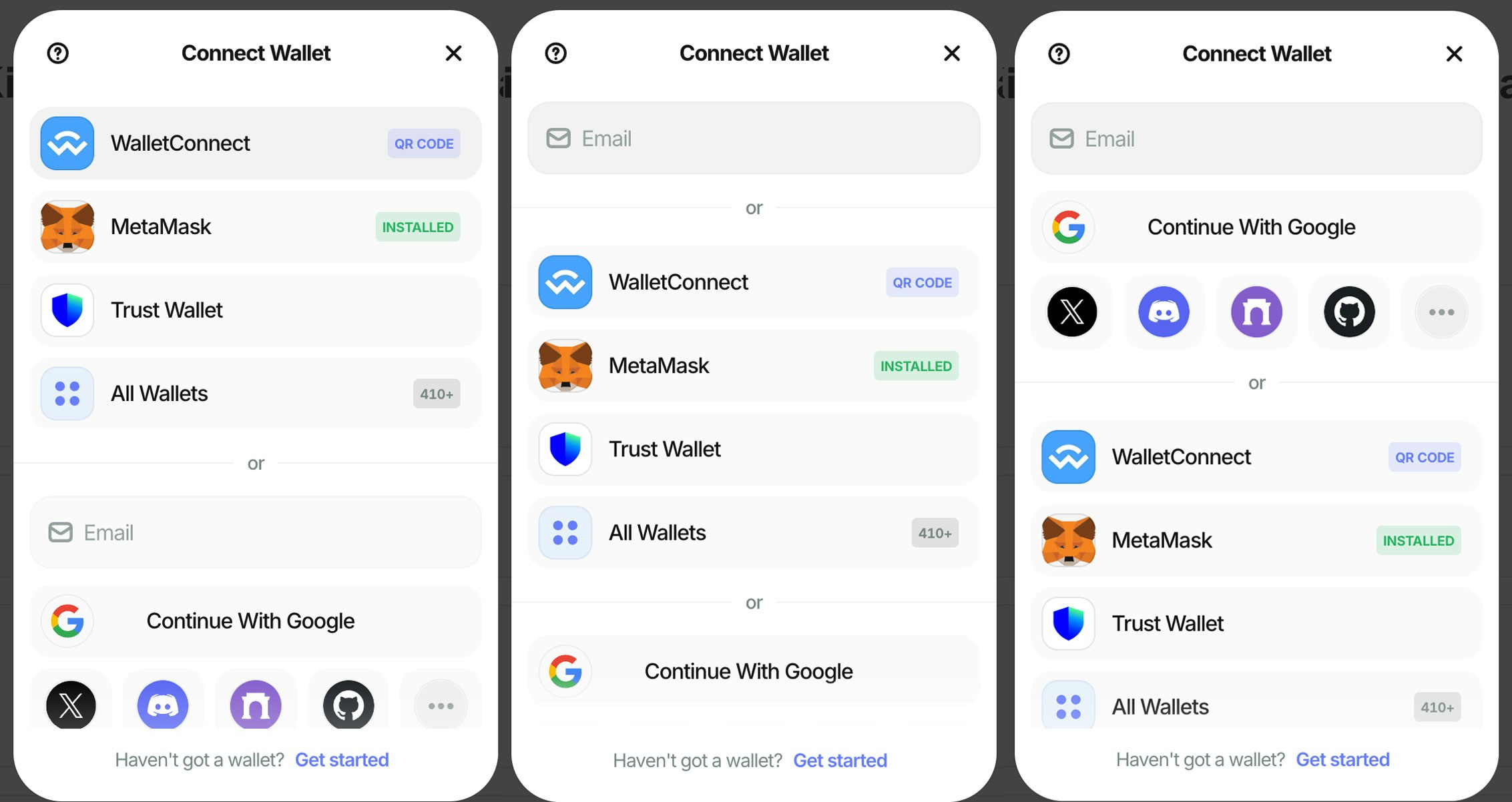 ```ts theme={null}
createAppKit({
//...
features: {
connectMethodsOrder: ["social", "email", "wallet"],
},
});
```
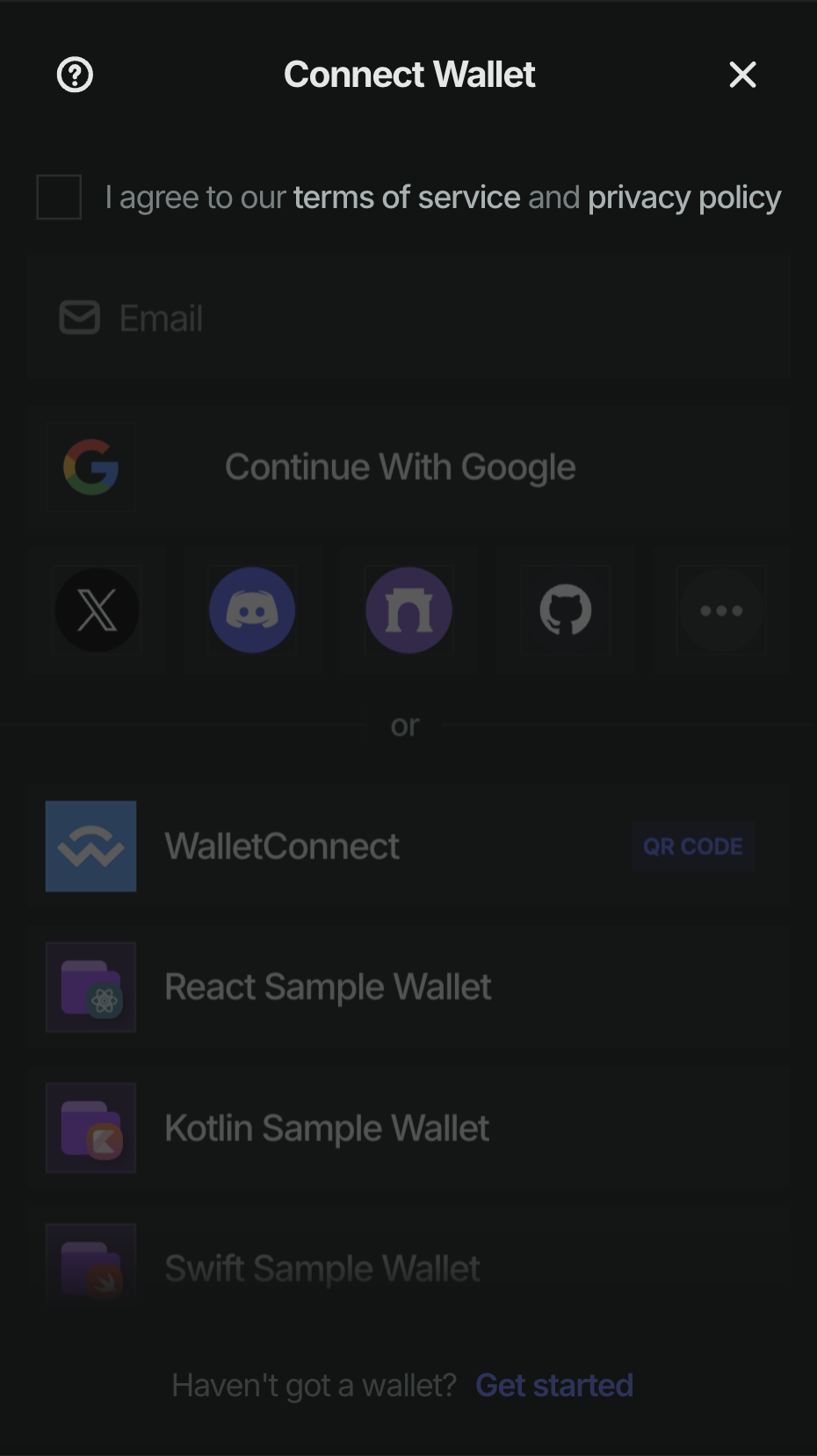
### legalCheckbox
Enable or disable the terms of service and/or privacy policy checkbox.
```ts theme={null}
createAppKit({
//...
features: {
legalCheckbox: true,
},
});
```
```ts theme={null}
createAppKit({
//...
features: {
connectMethodsOrder: ["social", "email", "wallet"],
},
});
```
### legalCheckbox
Enable or disable the terms of service and/or privacy policy checkbox.
```ts theme={null}
createAppKit({
//...
features: {
legalCheckbox: true,
},
});
```
 ## customWallets
Adds custom wallets to the modal. `customWallets` is an array of objects, where each object contains specific information of a custom wallet.
```ts theme={null}
createAppKit({
//...
customWallets: [
{
id: "myCustomWallet",
name: "My Custom Wallet",
homepage: "www.mycustomwallet.com", // Optional
image_url: "my_custom_wallet_image", // Optional
mobile_link: "mobile_link", // Optional - Deeplink or universal
desktop_link: "desktop_link", // Optional - Deeplink
webapp_link: "webapp_link", // Optional
app_store: "app_store", // Optional
play_store: "play_store", // Optional
},
],
});
```
## AllWallets
If the "All Wallets" button is removed on mobile, all the mobile wallets that were not added on the main view of the modal **won't** be able to connect to your website via WalletConnect protocol.
The `allWallets` parameter allows you to add or remove the "All Wallets" button on the modal.
| Value | Description |
| ------------- | -------------------------------------------------------- |
| `SHOW` | Shows the "All Wallets" button on AppKit. |
| `HIDE` | Removes the "All Wallets" button from AppKit. |
| `ONLY_MOBILE` | Shows the "All Wallets" button on AppKit only on mobile. |
```ts theme={null}
createAppKit({
//...
allWallets: "ONLY_MOBILE",
});
```
## includeWalletIds & excludeWalletIds
Wallets that are either not included or excluded **won't** be able to connect to your website on mobile via WalletConnect protocol.
### includeWalletIds
Override default recommended wallets that are fetched from [WalletGuide](https://walletguide.walletconnect.network/).
Array of wallet ids defined will be shown (order is respected).
Unlike `featuredWalletIds`, these wallets will be the **only** ones shown in `All Wallets` view and as recommended wallets.
You can find the wallets IDs in our [Wallets List](/cloud/wallets/wallet-list).
```ts theme={null}
createAppKit({
//...
includeWalletIds: [
"1ae92b26df02f0abca6304df07debccd18262fdf5fe82daa81593582dac9a369",
"4622a2b2d6af1c9844944291e5e7351a6aa24cd7b23099efac1b2fd875da31a0",
],
});
```
### excludeWalletIds
Exclude wallets that are fetched from [WalletGuide](https://walletguide.walletconnect.network/).
Array of wallet ids defined will be excluded. All other wallets will be shown in respective places.
You can find the wallets IDs in our [Wallets List](/cloud/wallets/wallet-list).
```ts theme={null}
createAppKit({
//...
excludeWalletIds: [
"1ae92b26df02f0abca6304df07debccd18262fdf5fe82daa81593582dac9a369",
"4622a2b2d6af1c9844944291e5e7351a6aa24cd7b23099efac1b2fd875da31a0",
],
});
```
### Coinbase Smart Wallet
The Coinbase connector now includes a new flag to customize the Smart Wallet behavior.
The `preference` (or `coinbasePreference`) flag accepts one of the following string values:
* `eoaOnly`: Uses EOA Browser Extension or Mobile Coinbase Wallet.
* `smartWalletOnly`: Displays Smart Wallet popup.
* `all` (default): Supports both `eoaOnly` and `smartWalletOnly` based on context.
AppKit can be configured in **two** different ways: **Default** or **Custom**
Select your preferred configuration mode below:
Learn more about the Coinbase connector in the [Wagmi documentation](https://wagmi.sh/react/api/connectors/coinbaseWallet#preference).
```ts Default {4} theme={null}
createAppKit({
//...
enableCoinbase: true, // true by default
coinbasePreference: "smartWalletOnly",
});
```
```ts Custom {8} theme={null}
import { WagmiAdapter } from "@reown/appkit-adapter-wagmi";
const adapter = new WagmiAdapter({
//...
connectors: [
coinbaseWallet({
//...
preference: "smartWalletOnly",
}),
projectId,
networks,
],
});
export const config = wagmiAdapter.wagmiConfig;
```
```ts {4} theme={null}
createAppKit({
//...
enableCoinbase: true, // true by default
coinbasePreference: "smartWalletOnly",
});
```
## customRpcUrls
This function allows you to add custom RPC URLs to override the default network RPC URLs for native RPC calls. This is useful when you want to use your own RPC endpoints instead of the defaults.
```ts theme={null}
type CustomRpcUrl = {
url: string
config?: HttpTransportConfig // Optional transport configuration
}
type CustomRpcUrlMap = Record
createAppKit({
//...
customRpcUrls: {
'eip155:1': [
{
url: 'https://your-custom-mainnet-url.com',
config: {
// Optional HTTP transport configuration
}
}
],
'eip155:137': [
{
url: 'https://your-custom-polygon-url.com'
}
]
}
})
```
If you are using the Wagmi adapter, you need to pass the same `customRpcUrls` configuration to both the `WagmiAdapter` and `createAppKit`.
```ts theme={null}
const customRpcUrls: CustomRpcUrlMap = {
'eip155:1': [{ url: 'https://your-custom-mainnet-url.com' }],
'eip155:137': [{ url: 'https://your-custom-polygon-url.com' }]
}
const wagmiAdapter = new WagmiAdapter({
networks: [...],
projectId: "project-id",
customRpcUrls
})
const modal = createAppKit({
adapters: [...],
networks: [...],
projectId: "project-id",
customRpcUrls
})
```
When using the Wagmi adapter, you don't need to configure [`transports`](https://wagmi.sh/core/api/createConfig#transports) separately. The WagmiAdapter will automatically configure them based on your `customRpcUrls`.
However, if you use both `customRpcUrls` and Wagmi's `transports` property, be aware that `transports` will take precedence and override any conflicting RPC URLs defined in `customRpcUrls`.
```ts theme={null}
const wagmiAdapter = new WagmiAdapter({
//...
customRpcUrls: {
'eip155:1': [{ url: 'https://custom-rpc-1.com' }] // This will be overridden
},
transports: {
[mainnet.id]: http('https://transport-rpc-1.com') // This takes precedence
}
})
```
## universalProviderConfigOverride
Lets you customize specific aspects of the provider's behavior.
```ts theme={null}
createAppKit({
//...
universalProviderConfigOverride: {
methods: { eip155: ['eth_sendTransaction', 'personal_sign'] },
chains: { eip155: ['1', '137'] },
events: { eip155: ['chainChanged', 'accountsChanged'] },
rpcMap: { eip155:1: 'https://ethereum.publicnode.com' },
defaultChain: 'eip155:1'
},
});
```
You can override any of the following properties:
* `methods`: Custom RPC methods for each namespace
* `chains`: Supported chains for each namespace
* `events`: Events to subscribe to for each namespace
* `rpcMap`: Custom RPC URLs for specific chains
* `defaultChain`: The default chain to connect to
## allowUnsupportedChain
Allow users to switch to an unsupported chain. This parameter prevents the switch network dialog when a user connects to a network not listed under the `networks` attribute.
```ts theme={null}
createAppKit({
//...
allowUnsupportedChain: true,
});
```
## customWallets
Adds custom wallets to the modal. `customWallets` is an array of objects, where each object contains specific information of a custom wallet.
```ts theme={null}
createAppKit({
//...
customWallets: [
{
id: "myCustomWallet",
name: "My Custom Wallet",
homepage: "www.mycustomwallet.com", // Optional
image_url: "my_custom_wallet_image", // Optional
mobile_link: "mobile_link", // Optional - Deeplink or universal
desktop_link: "desktop_link", // Optional - Deeplink
webapp_link: "webapp_link", // Optional
app_store: "app_store", // Optional
play_store: "play_store", // Optional
},
],
});
```
## AllWallets
If the "All Wallets" button is removed on mobile, all the mobile wallets that were not added on the main view of the modal **won't** be able to connect to your website via WalletConnect protocol.
The `allWallets` parameter allows you to add or remove the "All Wallets" button on the modal.
| Value | Description |
| ------------- | -------------------------------------------------------- |
| `SHOW` | Shows the "All Wallets" button on AppKit. |
| `HIDE` | Removes the "All Wallets" button from AppKit. |
| `ONLY_MOBILE` | Shows the "All Wallets" button on AppKit only on mobile. |
```ts theme={null}
createAppKit({
//...
allWallets: "ONLY_MOBILE",
});
```
## includeWalletIds & excludeWalletIds
Wallets that are either not included or excluded **won't** be able to connect to your website on mobile via WalletConnect protocol.
### includeWalletIds
Override default recommended wallets that are fetched from [WalletGuide](https://walletguide.walletconnect.network/).
Array of wallet ids defined will be shown (order is respected).
Unlike `featuredWalletIds`, these wallets will be the **only** ones shown in `All Wallets` view and as recommended wallets.
You can find the wallets IDs in our [Wallets List](/cloud/wallets/wallet-list).
```ts theme={null}
createAppKit({
//...
includeWalletIds: [
"1ae92b26df02f0abca6304df07debccd18262fdf5fe82daa81593582dac9a369",
"4622a2b2d6af1c9844944291e5e7351a6aa24cd7b23099efac1b2fd875da31a0",
],
});
```
### excludeWalletIds
Exclude wallets that are fetched from [WalletGuide](https://walletguide.walletconnect.network/).
Array of wallet ids defined will be excluded. All other wallets will be shown in respective places.
You can find the wallets IDs in our [Wallets List](/cloud/wallets/wallet-list).
```ts theme={null}
createAppKit({
//...
excludeWalletIds: [
"1ae92b26df02f0abca6304df07debccd18262fdf5fe82daa81593582dac9a369",
"4622a2b2d6af1c9844944291e5e7351a6aa24cd7b23099efac1b2fd875da31a0",
],
});
```
### Coinbase Smart Wallet
The Coinbase connector now includes a new flag to customize the Smart Wallet behavior.
The `preference` (or `coinbasePreference`) flag accepts one of the following string values:
* `eoaOnly`: Uses EOA Browser Extension or Mobile Coinbase Wallet.
* `smartWalletOnly`: Displays Smart Wallet popup.
* `all` (default): Supports both `eoaOnly` and `smartWalletOnly` based on context.
AppKit can be configured in **two** different ways: **Default** or **Custom**
Select your preferred configuration mode below:
Learn more about the Coinbase connector in the [Wagmi documentation](https://wagmi.sh/react/api/connectors/coinbaseWallet#preference).
```ts Default {4} theme={null}
createAppKit({
//...
enableCoinbase: true, // true by default
coinbasePreference: "smartWalletOnly",
});
```
```ts Custom {8} theme={null}
import { WagmiAdapter } from "@reown/appkit-adapter-wagmi";
const adapter = new WagmiAdapter({
//...
connectors: [
coinbaseWallet({
//...
preference: "smartWalletOnly",
}),
projectId,
networks,
],
});
export const config = wagmiAdapter.wagmiConfig;
```
```ts {4} theme={null}
createAppKit({
//...
enableCoinbase: true, // true by default
coinbasePreference: "smartWalletOnly",
});
```
## customRpcUrls
This function allows you to add custom RPC URLs to override the default network RPC URLs for native RPC calls. This is useful when you want to use your own RPC endpoints instead of the defaults.
```ts theme={null}
type CustomRpcUrl = {
url: string
config?: HttpTransportConfig // Optional transport configuration
}
type CustomRpcUrlMap = Record
createAppKit({
//...
customRpcUrls: {
'eip155:1': [
{
url: 'https://your-custom-mainnet-url.com',
config: {
// Optional HTTP transport configuration
}
}
],
'eip155:137': [
{
url: 'https://your-custom-polygon-url.com'
}
]
}
})
```
If you are using the Wagmi adapter, you need to pass the same `customRpcUrls` configuration to both the `WagmiAdapter` and `createAppKit`.
```ts theme={null}
const customRpcUrls: CustomRpcUrlMap = {
'eip155:1': [{ url: 'https://your-custom-mainnet-url.com' }],
'eip155:137': [{ url: 'https://your-custom-polygon-url.com' }]
}
const wagmiAdapter = new WagmiAdapter({
networks: [...],
projectId: "project-id",
customRpcUrls
})
const modal = createAppKit({
adapters: [...],
networks: [...],
projectId: "project-id",
customRpcUrls
})
```
When using the Wagmi adapter, you don't need to configure [`transports`](https://wagmi.sh/core/api/createConfig#transports) separately. The WagmiAdapter will automatically configure them based on your `customRpcUrls`.
However, if you use both `customRpcUrls` and Wagmi's `transports` property, be aware that `transports` will take precedence and override any conflicting RPC URLs defined in `customRpcUrls`.
```ts theme={null}
const wagmiAdapter = new WagmiAdapter({
//...
customRpcUrls: {
'eip155:1': [{ url: 'https://custom-rpc-1.com' }] // This will be overridden
},
transports: {
[mainnet.id]: http('https://transport-rpc-1.com') // This takes precedence
}
})
```
## universalProviderConfigOverride
Lets you customize specific aspects of the provider's behavior.
```ts theme={null}
createAppKit({
//...
universalProviderConfigOverride: {
methods: { eip155: ['eth_sendTransaction', 'personal_sign'] },
chains: { eip155: ['1', '137'] },
events: { eip155: ['chainChanged', 'accountsChanged'] },
rpcMap: { eip155:1: 'https://ethereum.publicnode.com' },
defaultChain: 'eip155:1'
},
});
```
You can override any of the following properties:
* `methods`: Custom RPC methods for each namespace
* `chains`: Supported chains for each namespace
* `events`: Events to subscribe to for each namespace
* `rpcMap`: Custom RPC URLs for specific chains
* `defaultChain`: The default chain to connect to
## allowUnsupportedChain
Allow users to switch to an unsupported chain. This parameter prevents the switch network dialog when a user connects to a network not listed under the `networks` attribute.
```ts theme={null}
createAppKit({
//...
allowUnsupportedChain: true,
});
```