> ## Documentation Index
> Fetch the complete documentation index at: https://docs.reown.com/llms.txt
> Use this file to discover all available pages before exploring further.
# How to Sign Messages, Send Transactions, and Get Balance in EVM using AppKit with Ethers
Learn how to use Reown AppKit for essential wallet functionalities such as signing messages, sending transactions, and retrieving wallet balances.
***
In this recipe, you will learn how to:
* Retrieve the balance of the connected wallet
* Sign a message using a connected wallet
* Send a transaction to the EVM blockchain
This guide takes approximately 20 minutes to complete.
Let’s dive in!
## Prerequisites
* A fundamental understanding of JavaScript and React.
* A minimal installation of AppKit in React.
* Obtain a new project Id on Reown Dashboard at [https://dashboard.reown.com](https://dashboard.reown.com)
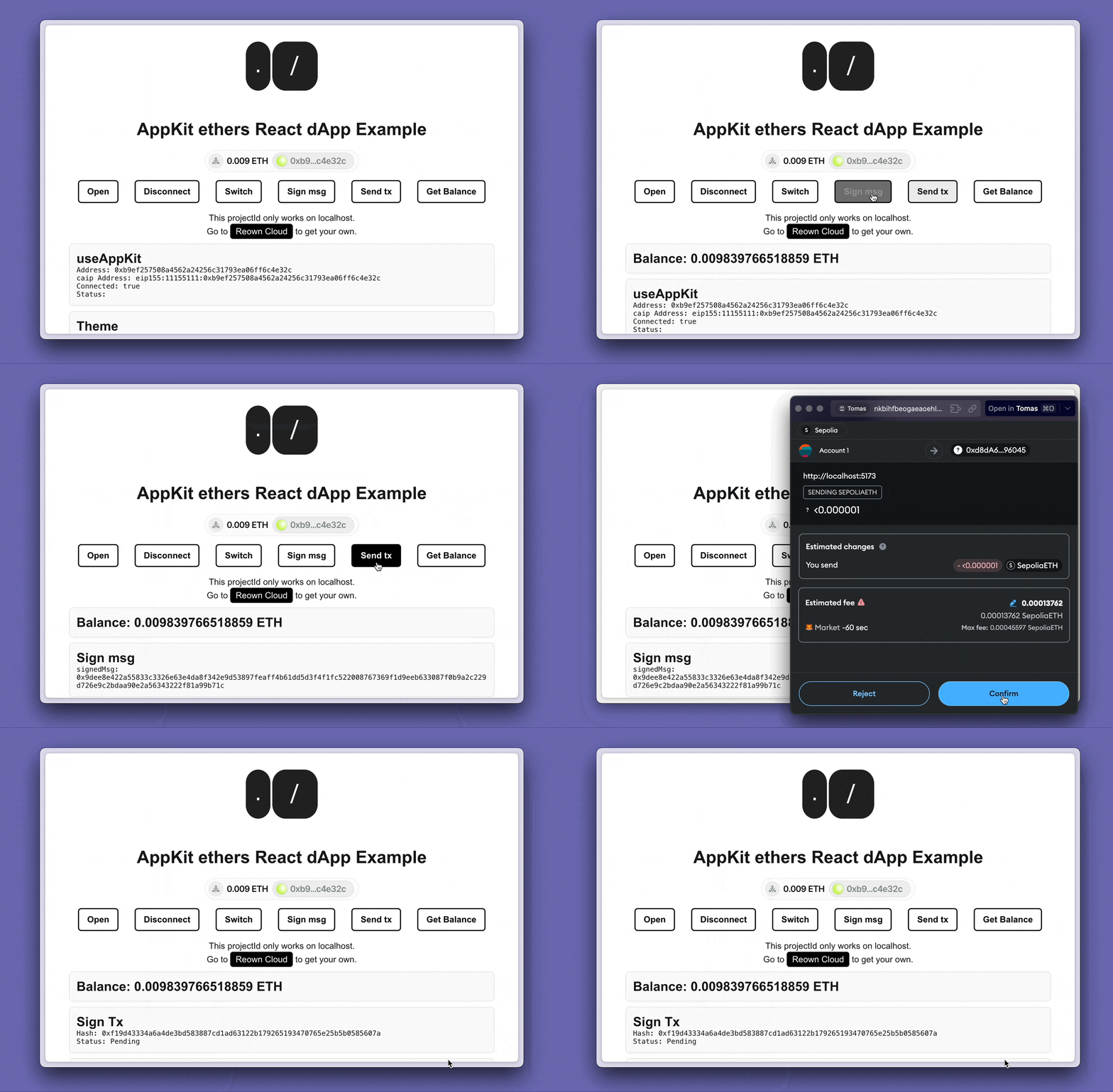
## Final project
Download the full project to try it directly on your computer.
## AppKit Minimal Installation
You can start a small project following the guidelines from our [installation React docs using Ethers](https://docs.reown.com/appkit/react/core/installation?platform=ethers)
## Start building
In this guide we are going to use the library [Ethers](https://docs.ethers.org/v6/) to make calls to the blockchain and to interact with the wallet.
To get the balance, sign a message and send a transaction follow the same steps in each operation:
1. Start by importing the BrowserProvider object, some AppKit hooks to get the account information, chain id and the Provider.
```jsx theme={null}
import {
useAppKitAccount,
useAppKitProvider,
useAppKitNetworkCore,
type Provider,
} from "@reown/appkit/react";
import {
BrowserProvider,
JsonRpcSigner,
formatEther,
parseUnits,
} from "ethers";
```
2. Use the `useAppKitAccount` hook to retrieve the user's address and check if they are connected. The `useAppKitNetworkCore` hook to get the chain id and the `useAppKitProvider` hook to get the wallet provider.
```jsx theme={null}
// AppKit hook to get the address and check if the user is connected
const { address, isConnected } = useAppKitAccount();
// AppKit hook to get the chain id
const { chainId } = useAppKitNetworkCore();
// AppKit hook to get the wallet provider
const { walletProvider } = useAppKitProvider("eip155");
```
### Get Balance
Fetching a user's balance is straightforward using the `BrowserProvider` object from ethers.
3. Create a function to fetch and display (in console) the balance when triggered
```jsx theme={null}
// function to get the balance
const handleGetBalance = async () => {
const provider = new BrowserProvider(walletProvider, chainId);
const balance = await provider.getBalance(address);
const eth = formatEther(balance);
console.log(`${eth} ETH`);
};
```
4. Finally, to call the function you can show the button in a component when `isConnected` is `true`
```jsx theme={null}
return (
isConnected && (
)
);
```
### Sign a message
To raise the modal to sign a message with your wallet. You can follow with these steps:
3. Generate the function to raise the modal to sign the message
```jsx theme={null}
// function to sing a msg
const handleSignMsg = async () => {
// create the provider and signer
const provider = new BrowserProvider(walletProvider, chainId);
const signer = new JsonRpcSigner(provider, address);
// sign the message
const signature = await signer?.signMessage("Hello Reown AppKit!");
// log the signature
console.log(signature);
};
```
4. Finally, to call the function:
```jsx theme={null}
return (
isConnected && (
)
);
```
### Send a transaction in EVM
In order to raise the modal to sign and send a transaction with your wallet. You can follow with these steps:
3. Create the test transaction
```jsx theme={null}
// test transaction
const TEST_TX = {
to: "0xd8da6bf26964af9d7eed9e03e53415d37aa96045" as Address, // vitalik address
value: parseUnits('0.0001', 'gwei')
}
```
4. Generate the function to raise the modal to send the transaction
```jsx theme={null}
// function to send a TX
const handleSendTx = async () => {
// create the provider and signer
const provider = new BrowserProvider(walletProvider, chainId);
const signer = new JsonRpcSigner(provider, address);
// send the transaction
const tx = await signer.sendTransaction(TEST_TX);
// log the transaction
console.log(tx);
};
```
4. Finally, to invoke the function:
```jsx theme={null}
return (
isConnected && (
)
);
```
## Conclusion
By following this guide, you've learned how to integrate Reown AppKit and Ethers in your React application to perform essential wallet operations.
You can now fetch wallet balances, sign messages, and send transactions seamlessly in an EVM-compatible blockchain environment.
Keep exploring AppKit to enhance your dApp's functionality and user experience!
 ## Prerequisites
* A fundamental understanding of JavaScript and React.
* A minimal installation of AppKit in React.
* Obtain a new project Id on Reown Dashboard at [https://dashboard.reown.com](https://dashboard.reown.com)
## Final project
## Prerequisites
* A fundamental understanding of JavaScript and React.
* A minimal installation of AppKit in React.
* Obtain a new project Id on Reown Dashboard at [https://dashboard.reown.com](https://dashboard.reown.com)
## Final project