> ## Documentation Index
> Fetch the complete documentation index at: https://docs.reown.com/llms.txt
> Use this file to discover all available pages before exploring further.

# How to Use Wallet Buttons in AppKit React

Learn how to use wallet buttons in AppKit React to provide direct connection options for MetaMask, Trust Wallet, and other wallets without opening the traditional modal.

***

In this recipe, you will learn how to:

* Install and set up wallet buttons in your React application.
* Create custom wallet connection buttons for MetaMask and Trust Wallet.
* Customize wallet buttons for different blockchain namespaces.

This guide takes approximately 10 minutes to complete.

Let's dive in!

<Frame>
  <img src="https://mintcdn.com/reown-5552f0bb/EKbxEvu_zecC7Jp2/images/assets/walletButtons.jpg?fit=max&auto=format&n=EKbxEvu_zecC7Jp2&q=85&s=4311e99e62b86393bba087f4d750f58f" width="1416" height="356" data-path="images/assets/walletButtons.jpg" />
</Frame>

## Prerequisites

* A fundamental understanding of JavaScript and React.
* A minimal installation of AppKit in React.
* Obtain a new project Id on Reown Dashboard at [https://dashboard.reown.com](https://dashboard.reown.com)

## What are wallet buttons?

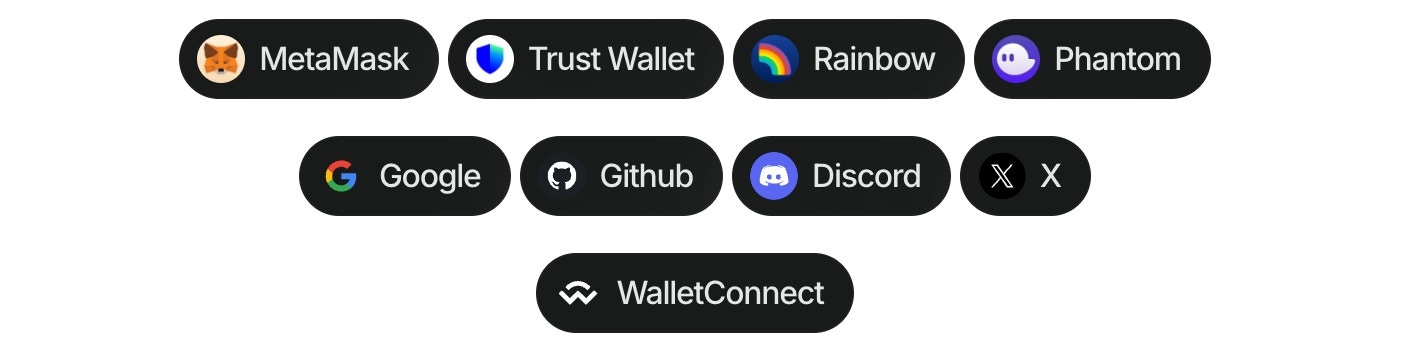
Using the wallet button components ([Demo in our Lab](https://appkit-lab.reown.com/appkit/?name=wagmi)), you can directly connect to more than 40 of the top wallets globally, WalletConnect QR, and all the social logins. This component allows you to customize your dApp, enabling users to connect their wallets effortlessly, all without the need to open the traditional modal.

## Installation

Install the wallet button package in your React project:

<CodeGroup>
  ```bash npm theme={null}
  npm install @reown/appkit-wallet-button
  ```

  ```bash Yarn theme={null}
  yarn add @reown/appkit-wallet-button
  ```

  ```bash Bun theme={null}
  bun a @reown/appkit-wallet-button
  ```

  ```bash pnpm theme={null}
  pnpm add @reown/appkit-wallet-button
  ```
</CodeGroup>

## Basic usage

### Step 1: Import the library

Import the wallet button library in your React component:

```tsx theme={null}
import "@reown/appkit-wallet-button/react";
```

### Step 2: Add wallet buttons to your component

Use the `<appkit-wallet-button />` web component to create connection buttons for specific wallets:

```tsx theme={null}
function App() {
  return (
    <div>
      <h1>Connect Your Wallet</h1>
      
      {/* MetaMask button */}
      <appkit-wallet-button wallet="metamask" />
      
      {/* Trust Wallet button */}
      <appkit-wallet-button wallet="trust" />
    </div>
  );
}

export default App;
```

That's it! The wallet buttons will automatically handle the connection flow for the specified wallets.

## Multichain support

You can specify a blockchain namespace to target specific chains:

```tsx theme={null}
{/* Connect to Ethereum/EVM chains */}
<appkit-wallet-button wallet="metamask" namespace="eip155" />

{/* Connect to Solana */}
<appkit-wallet-button wallet="phantom" namespace="solana" />

{/* Connect to Bitcoin */}
<appkit-wallet-button wallet="leather" namespace="bip122" />
```

## Complete example

Here's a complete example showing MetaMask and Trust Wallet buttons with EVM support:

```tsx theme={null}
import "@reown/appkit-wallet-button/react";

function WalletConnection() {
  return (
    <div style={{ padding: "20px" }}>
      <h1>Connect to Your Wallet</h1>
      <p>Choose your preferred wallet to connect:</p>
      
      <div style={{ display: "flex", gap: "10px", marginTop: "20px" }}>
        {/* MetaMask button for EVM chains */}
        <appkit-wallet-button wallet="metamask" namespace="eip155" />
        
        {/* Trust Wallet button for EVM chains */}
        <appkit-wallet-button wallet="trust" namespace="eip155" />
      </div>
      
      <div style={{ marginTop: "20px" }}>
        {/* WalletConnect QR code option */}
        <appkit-wallet-button wallet="walletConnect" />
      </div>
    </div>
  );
}

export default WalletConnection;
```

## Available wallet options

You can use the wallet button component with any of the following options:

| Type          | Options                                                                                                                                                                                                                                                                                                                                                                                                                               |
| ------------- | ------------------------------------------------------------------------------------------------------------------------------------------------------------------------------------------------------------------------------------------------------------------------------------------------------------------------------------------------------------------------------------------------------------------------------------- |
| QR Code       | walletConnect                                                                                                                                                                                                                                                                                                                                                                                                                         |
| Wallets       | metamask, trust, coinbase, rainbow, jupiter, solflare, coin98, magic-eden, backpack, frontier, xverse, okx, bitget, leather, binance, uniswap, safepal, bybit, phantom, ledger, timeless-x, safe, zerion, oneinch, crypto-com, imtoken, kraken, ronin, robinhood, exodus, argent, tokenpocket, haha, ambire-wallet, bitpay, blade-wallet, brave, coinstats, kresus-superapp, plena-app, status, tomo-wallet, valora, and zengo-wallet |
| Social logins | google, github, apple, facebook, x, discord and farcaster                                                                                                                                                                                                                                                                                                                                                                             |

## Namespace options

| Value    | Description                        |
| -------- | ---------------------------------- |
| `eip155` | Ethereum and EVM-compatible chains |
| `solana` | Solana blockchain                  |
| `bip122` | Bitcoin blockchain                 |

## Conclusion

By following this guide, you've learned how to implement wallet buttons in your React application using AppKit. This provides a streamlined connection experience for your users, allowing them to connect directly to their preferred wallets like MetaMask and Trust Wallet without opening the full modal.

Keep exploring AppKit to enhance your dApp's functionality and user experience!